 Github
 Slack

Build your own inbound filters to drop errors, logs, metrics, and spans before they count toward your quota, combining different and new conditions.
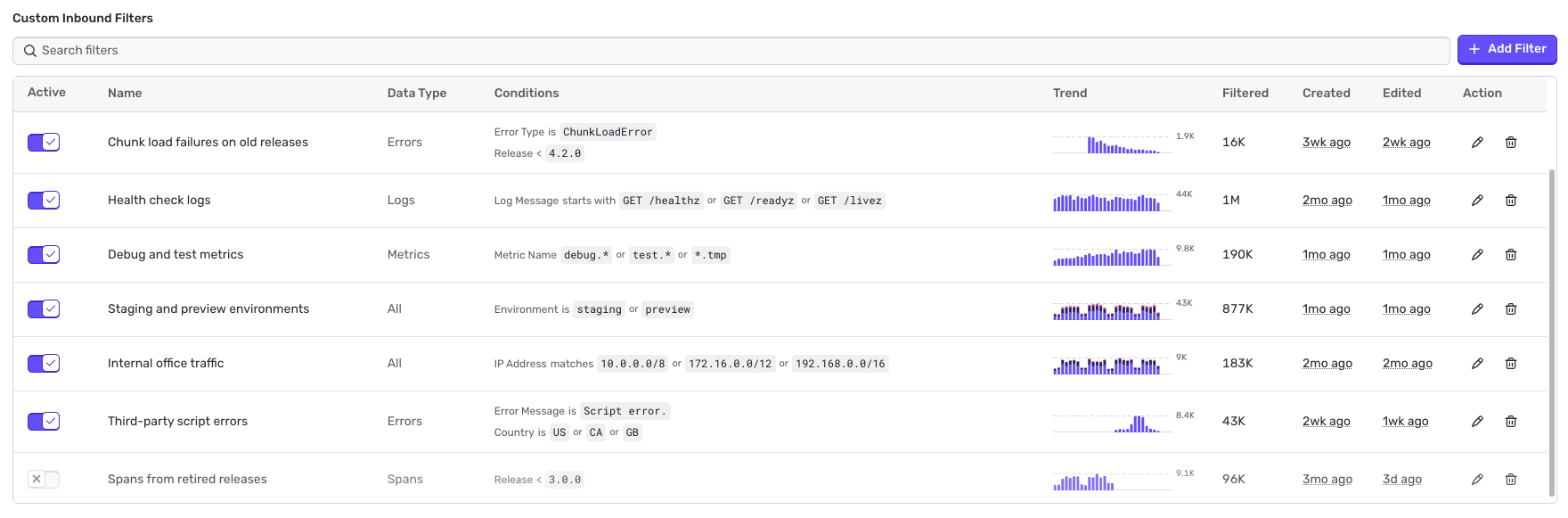
The built-in inbound filters cover the common cases: browser extensions, web crawlers, legacy browsers, but noise can come from different sources. Flaky errors on an old release, health checks, or a metric someone added for a debug session and forgot. Custom filters allow you to specify these with more precision, and filter out just what you don't need.
In Project Settings > Inbound Filters, click Add Filter and specify your conditions. Sentry drops anything that matches all of them at ingest. For example:
error_type:TypeError release:<2.0.0drops one TypeError from old releaseslog_message:*DEBUG*drops debug logsip_address:10.0.0.0/8drops internal traffic
You can now filter by error message and error type independently, as well as by country. For releases, we have added version comparisons, so instead of enumerating all releases you'd like to filter, you can cover all releases before 2.0.0 by using release:<2.0.0.
Each filter shows how much data it dropped in the last 30 days, so you can see if it does what you intended. You can alter the filter or switch it off if it drops too much.
Custom inbound filters are available on Business and Enterprise plans. Learn more in our docs.